
Restoring Revenue Visibility in Magento 2
Executive Summary
Overcoming Challenges with Strategic Solutions
Client Platform: Adobe Commerce (Magento 2)
Challenge: A critical loss of revenue attribution data during the transition from Universal Analytics (UA) to Google Analytics 4 (GA4).
Solution: A forensic audit of the Data Layer and a custom-engineered integration using WeltPixel and Google Tag Manager.
Key Result: 100% Revenue Visibility Restored, allowing the client to resume data-backed marketing decisions.

The Challenge: A Sudden Black Hole in the Data
For any e-commerce business, data is the compass. Without accurate revenue tracking, marketing teams are flying blind and unable to calculate Return on Ad Spend (ROAS), unable to determine which products are trending, and unable to justify marketing budgets.
During the industry-wide transition from Google’s Universal Analytics (UA) to the new Google Analytics 4 (GA4), a critical issue emerged for several of our high-volume Magento 2 clients. While user traffic was being recorded correctly in the new GA4 dashboards, the most important metric, revenue, had flatlined.
The dashboards showed thousands of visitors, but $0 in sales. This was a “Code Red” situation. The clients were panicking, assuming their stores were broken, or worse, that their paid media campaigns were suddenly burning cash with zero return.
The Complication: The "Wild West" of GA4
This issue occurred during the early days of the GA4 rollout. The digital landscape at this time was akin to the “Wild West.”
- Lack of Documentation: GA4 was a complete architectural departure from the previous version of Analytics. Google’s documentation was evolving daily, and clear answers on specific integration errors were non-existent.
- Platform Disconnect: Magento 2 is a robust but complex platform.
Standard plugins that worked flawlessly for years with Universal Analytics were incompatible with GA4’s new event-based data model. - No Support: Support tickets to Google went unanswered due to global volume, and Magento developers were scrambling to catch up.
There was no playbook to follow. We couldn’t just “Google the answer” because the answer didn’t exist yet. We had to engineer it.


The Strategy: A Forensic Data Audit
I took lead on the investigation, treating it as a forensic audit rather than a simple bug fix. My strategy was to trace the data journey from the moment a customer clicked “Place Order” to the moment that data hit Google’s servers.
The Hunt for the Broken Link
I spent weeks immersing myself in the client’s Data Layer: the invisible layer of code that sits between a website’s visual interface and its analytics tools. I scoured the internet for clues, read through developer forums in real-time, and cross-referenced the behavior of other e-commerce sites.
The investigation revealed the root cause: A Language Barrier. Magento was successfully firing the “purchase” signal, but it was speaking the old language of Universal Analytics. GA4 was listening, but it required a completely different schema (a specific structure of parameters and items arrays) to recognize that a sale had occurred.
The "Aha" Moment
The breakthrough came when I looked away from “all-in-one” plugins and focused on Google Tag Manager (GTM).
I realized that while we couldn’t easily force Magento to change how it spoke, we could use a “translator” in the middle. I found that the WeltPixel extension was successfully pushing the correct data into the Data Layer, but it wasn’t effectively communicating with GA4 on its own due to the client’s specific server-side configuration.
The solution wasn’t a single tool. It was a hybrid architecture. We needed the detailed data collection of WeltPixel combined with the flexible routing power of a custom GTM container.
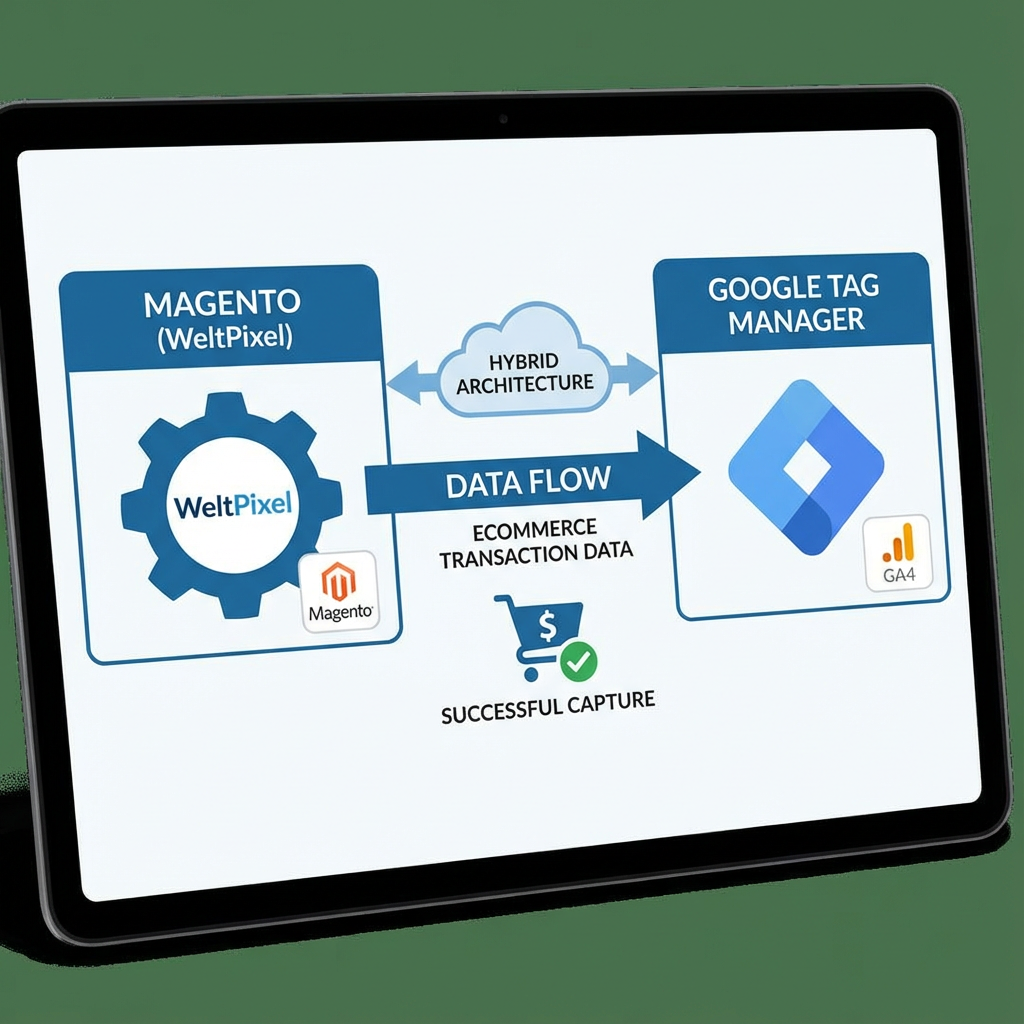
The Fix: Engineering a Custom Bridge
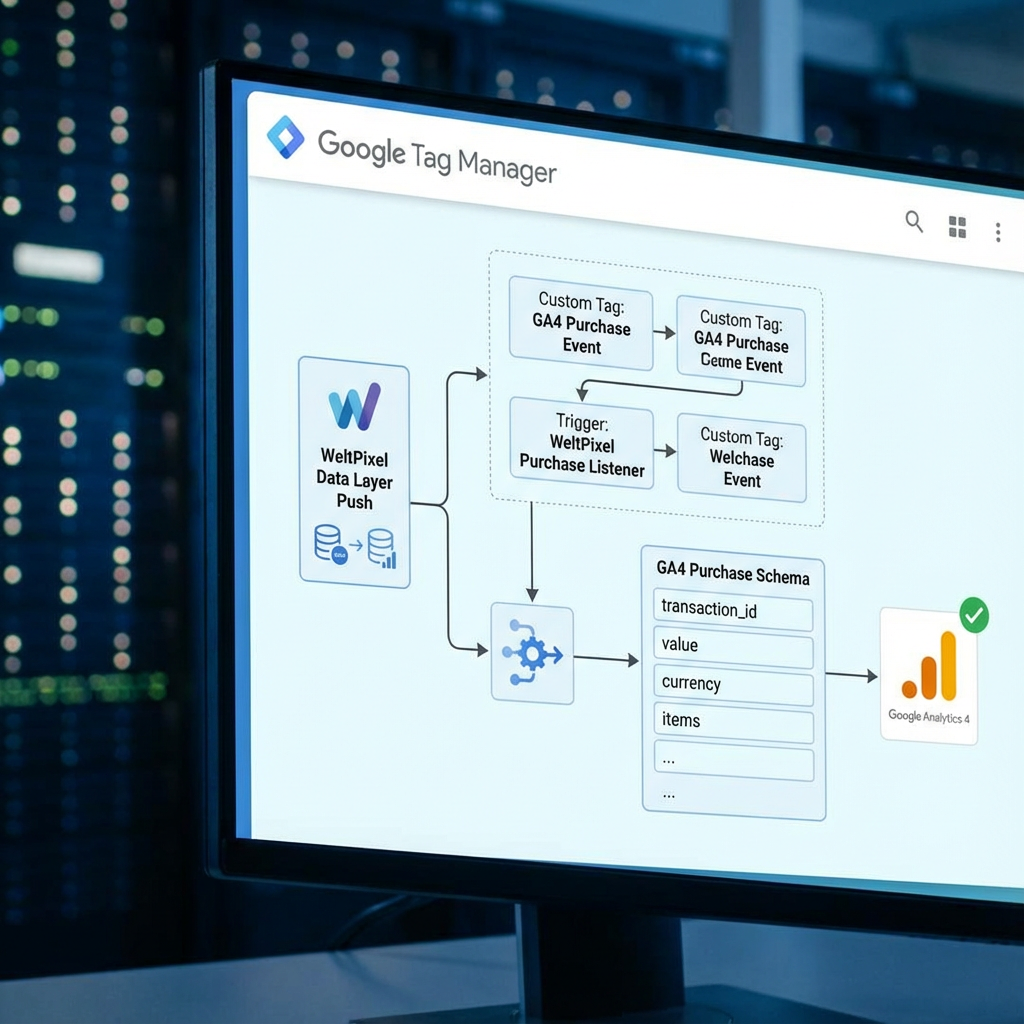
I architected a solution that restored full fidelity to the data:
Foundation:
We utilized the WeltPixel extension to ensure the Data Layer was populated with robust e-commerce variables (SKU, Price, Tax, Shipping).
The Bridge
I built a custom Google Tag Manager container. I manually configured tags and triggers that listened for the specific WeltPixel data pushes and instantly reformatted them into the strict “purchase” event schema required by GA4.
Validation
Using GTM’s “Debug Mode” and GA4’s “DebugView,” we ran test transactions to verify that every cent of revenue was arriving in the dashboard in real-time.
The Results: 100% Visibility
The fix was immediate and absolute.
-
Data Integrity: The client’s GA4 dashboard went from flatline to a heartbeat. Revenue tracking was restored with 100% accuracy, matching the backend sales data.
-
Strategic Confidence: With the data restored, the marketing team could once again see which campaigns were driving high-value orders versus low-value traffic.
-
Future-Proofing: By building this solution in Google Tag Manager, we created a flexible setup that wouldn’t break if the client decided to change plugins or platforms in the future.
This project was a testament to the fact that in technical SEO and analytics, “out of the box” solutions rarely suffice for complex businesses. It requires a deep understanding of the code to keep the business moving forward.